MES Chapter 1: Embedded?
processors · peripherals · digital signal processor (DSP) · compilers · debuggers · microprocessors · cross-compilers · OOP · cross-debugger · JTAG · hardware breakpoint · internal register · serial port terminal · hardware debugger · programmer · debug probe · in-circuit emulator (ICE) · adapter · RAM · ROM · flash · I/O lines · cost · modularity · maker boards · firmware update · sleep · watchdog · RTOS · FreeRTOS · vector table · reset vector · power-on behavior
Introduction
Hey guys. If you’re reading this, then you’re probably into embedded. I’m into it too. I didn’t even realize I was. When I was younger I would often break my toys just to play around with the internals: batteries, wires, motors, LEDs, magnets, speakers and so on. I once destroyed my RC helicopter just to use its powerful motor for one of my futile projects (I was trying to convert it into a plane engine with a propeller; it didn’t go far, though I think I remember it getting off the ground once, or that’s just my bias). The fascination of getting to know how and why stuff worked, connecting terminals of these components to the positive and negative of a stack of eight double-A batteries, was as far as my technical skills could go. Lots of memories 1 . The point is, I loved breaking things apart to konw how they worked so I could make the stuff I wanted.
Fast forward to college, doing a CS degree. This semester I ended up having a course unit called “Introduction to Embedded Systems”, and it took me a while to realize this was the kind of stuff I’d been trying to do all along, although with crude knowledge of how things actually worked. I could finally understand what was going on clearly rather than just guessing. We took a practical approach to learning, using the ESP32 and ESP32-S3 as our candidates, writing simple programs and interacting with the RTOS API, and I found that I really like this. So why not blog about it as well.
I decided to find a book that could formally introduce me to the fundamentals of making embedded systems, and what better book than Making Embedded Systems by Elecia White. I basically have the chance to share with you in real time as I learn. At the moment I can write a basic program for a calculator composed of a keypad, an LCD and an ESP32-S3 for basic arithmetic, but I have no experience interfacing with hardware directly without using an operating system, say AVR microcontrollers and the like. I hope to with time.
In these book notes I’ll share what I learn from the book chapter by chapter, in the context of my own experiences and activities. Feel free to tag along. We’ll talk about what the book is and about its first chapter.
About the book
This book, based on the information I have, is a good beginner book to get you into embedded, understand the realities of it, and get programming with it. It’s also written by Elecia White, who happens to host a podcast called Embedded 3(or is it embedded.fm?), which I realize I was about 13 years late to start listening to. I’ve just started with her earlier episodes and it’s pretty insightful; I highly recommend it if you’re looking for something like this.
The book is not designed to be a manual, so you basically read it from top to bottom. Elecia specifically suggests you do this, mainly so you don’t miss her jokes. It’s kind of hard to tell you what you’ll be learning, since I don’t understand half of what that is yet, but I can give you an idea of what I think it is: everything ranging from system architecture for embedded systems, interrupts, interacting with hardware and peripherals, maths (yes, maths), debugging, working with constraints, security, the whole shebang.
We’ll start with the scope from chapter one, just the main talking points with a bit of context from what I know so far, then I’ll end with a simple showcase of one of the programs for the ESP32-S3 to show you what this stuff actually looks like. You can check out more of these projects in my esp32-snacks repo.
Chapter 1 notes
Chapter 1 introduces you to what embedded systems are and the painful realities of creating them, probably so you can decide early enough whether or not to continue with this path.
Embedded systems are basically computer systems that are built for a specific purpose, kind of like lite, minimalistic computers for specific jobs, and as such their design reflects their purpose and the constraints within which they work. They comprise microcontrollers (the main unit that has the CPU, RAM and ROM), peripherals (the things you attach to the microcontroller to allow it to sense things around it or interact with its environment, kind of like plugins or extensions), and the instructions for the microcontroller, which is what you spend most of your time creating and is usually written in C and compiled to work on the microcontroller.
Cross-compilation
First, embedded systems use cross-compilers. You usually compile your C files to run on your computer, but since embedded systems have different CPU architectures and instruction sets, they need their own special kind of binary which we create using a cross-compiler. So basically you write your program using an editor on your PC, compile it using a cross-compiler, then flash the microcontroller with the build and have it running. You can use languages like assembly, C and C++, which are the main ones, but others are also available. You can borrow concepts like abstraction and encapsulation from object-oriented programming (OOP) to make programming easier.
The development cycle
The goal is to create a system that fits its application. This involves, as the book details: conception, prototyping, board bring-up, debugging, testing, release, maintenance, and repeating. You are rarely ever done with a system, since its applications can change, so you kind of have to balance between flexibility and doing what it has to do really well within the constraints of the environment, costs and hardware.
Embedded systems are usually manufactured, which means extra care is taken in shedding off as much cost, bugs and inefficiency as possible, because they multiply in production. For safety-critical applications you really have to take extra steps, including lots of paperwork. As a typical software developer who’s not so familiar with the consequences of flopping in such an environment, this is terrifying as hell. But it also means my hard work is more meaningful in a way.
The resources you work with
You basically need to work with these resources:
- Memory (RAM)
- Storage (ROM or flash)
- Processor cycles and speed
- Battery life
- Processor peripherals
Your programming basically involves using these resources to build a system that functions as intended. As you may already know, these resources are often limited in embedded systems, mainly because the systems built need to be profitable and last a long time. One of the most limited resources, which has also consistently been a pain for embedded engineers from what I’ve heard, is battery life, and in a way it dictates the limitations of other resources like lower processor speeds, fewer registers, peripherals that use less energy and so on.
Debugging, and why QA is your friend
Embedded programming is different from normal programming in a bad way. Debugging is hard, and it usually hides bugs you would encounter without debugging or shows bugs that only appear when debugging (sounds hellish, I know), plus adding support for it uses up resources (CPU cycles and storage). Usually old-school printfs or a variant of this is sufficient, but since embedded systems are time sensitive, adding them can hide some timing bugs too.
Furthermore, some bugs can actually destroy your hardware; compare this to stack overflows and segfaults. And to make things worse, even the most trivial of bugs could mean life or death for someone, so it’s akin to programming with hundreds of lives breathing down your neck, staring at your code. Maybe that’s not such a bad thing.
So this kind of changes the dynamic between you the programmer and QA. Unlike the typical scenario where, for some, QA serves to simply remind them of how bad their code is, here QA is your friend, saving the cost of failures in production and in the real world, which are almost nothing compared to those in typical software applications, to say the least. You want your bugs found.
Premature optimization
Another warning the book mentions is premature optimization. The temptation to make a function use fewer variables, use better structs or optimize some operation when you look at your code can be detrimental in the long run. The idea is to first create code that works, understand what resources it’s using and what’s involved, test it to make sure it works for what we need, and then optimize after. Otherwise you might optimize and add something that would be eliminated later on, or remove something that would be required to work with something else in a way your optimization blocks.
Implement → test → optimize, not implement → optimize → test. Remember, “We should forget about small efficiencies, say about 97% of the time: premature optimization is the root of all evil” — Donald Knuth.
Custom boards vs off-the-shelf boards
I’ve always wondered what the difference is between creating and using a custom board and just buying and programming one from vendors like Espressif; after all, there are lots of cool boards like Arduinos, ESPs, AVRs and so on. The difference is that one is a prototype and the other is a product designed to scale and meet specific design requirements, with a focus on cost and efficiency. So if you want to test out an idea, off-the-shelf maker boards are good, but if you’re developing a product to sell to the public, you probably want to double-check whether you need a custom board.
It’s also important to note that you need to get comfortable with not using vendor tools and frameworks for this exact reason. Understanding how to work with, debug and use hardware at the most basic level allows you to create custom boards and program them effectively without relying on a framework. The book notes that using these tools and frameworks actually feels like magic when you’re used to working with the hardware with almost no abstractions.
The interview question
I love that the book’s chapters end with an interview question, partly because it helps remind me of how little I know, but also because they have interesting insights into the minds of interviewers and what it takes to work on things in the real world. Take this one, for example.
Here is a computer with a compiler and an editor. Please implement "hello world."
Once you have the basic version working, add in the functionality to get a name
from the command line. Finally, tell me what happens before your code
executes — in other words, before the main() function.
(Thanks to Phillip King for this question.)
The interviewer mentions the need to understand important details we may take for granted, like what happens before main is called: “It is great if they can describe what happens implicitly (by the compiler) and what happens explicitly (in initialization code).”
With my current skill level, the best I can get to is explaining why we include certain header files, maybe a bit about the different abstraction layers from library functions to system calls, and also that main is the entry point. Further than that, I’m dry.
I tried to look into it, but to be honest I didn’t understand like half of it, probably because I’m slacking off on reading CS:APP 2.
Something about the C runtime startup code, having crt0 or cstart responsible for setting up the stack pointer, copying initialized globals from ROM to the .data section of RAM, filling in zeros in .bss for uninitialized globals, running constructors for global C++ objects, and only then calling main. Beneath that, for embedded, on reset the CPU gets the reset vector from the exception vector table, which points to the startup code, and early init sets up the clocks, interrupt vectors and critical peripherals before C can run. If you understood that, respect.
Programming an ESP32-S3 microcontroller
To give you an idea of what it’s like to program an embedded system, we’ll take this ESP32 program and break it down into sections. You can view the image from Wokwi to understand what it would look like. Wokwi is a cool site where you can write your programs and simulate the behaviour of different microcontrollers and peripherals, an invaluable tool for learning how to program these development boards and work with peripherals.
We’ll use the simplest program I think would be useful in helping you understand what programming with a peripheral attached looks like. You can find the project here if you’d like to know more about how it’s set up. It’s a program for displaying the numbers 0 through 9 on a seven-segment display using an ESP32-S3 microcontroller. There’s lots of ways to do this like using shift registers, but this is the simplest way I could think of, and it works. The code is written in C.
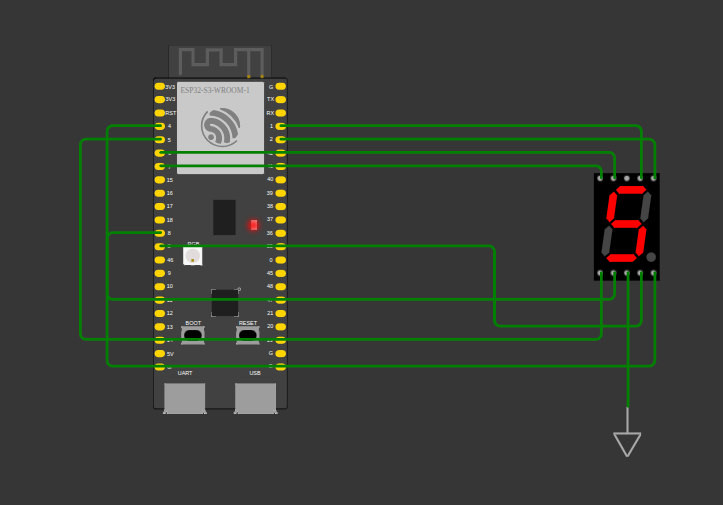
The circuit in Wokwi: each segment of the display gets its own GPIO pin.
#include "driver/gpio.h"
#include "freertos/FreeRTOS.h"
#include "freertos/projdefs.h"
#include "freertos/task.h"
#include "hal/gpio_types.h"
#include <stdio.h>

#define A GPIO_NUM_1
#define B GPIO_NUM_2
#define C GPIO_NUM_3
#define D GPIO_NUM_4
#define E GPIO_NUM_5
#define F GPIO_NUM_6
#define G GPIO_NUM_7
#define DOT GPIO_NUM_8

void app_main(void) {

  // int pattern = 0b00000111;
  int patterns[10] = {0b00111111, 0b00000110, 0b01011011, 0b01001111,
                      0b01100110, 0b01101101, 0b01111101, 0b00000111,
                      0b01111111, 0b01101111};

  gpio_reset_pin(A);
  gpio_reset_pin(B);
  gpio_reset_pin(C);
  gpio_reset_pin(D);
  gpio_reset_pin(E);
  gpio_reset_pin(F);
  gpio_reset_pin(G);
  gpio_reset_pin(DOT);

  gpio_set_direction(A, GPIO_MODE_OUTPUT);
  gpio_set_direction(B, GPIO_MODE_OUTPUT);
  gpio_set_direction(C, GPIO_MODE_OUTPUT);
  gpio_set_direction(D, GPIO_MODE_OUTPUT);
  gpio_set_direction(E, GPIO_MODE_OUTPUT);
  gpio_set_direction(F, GPIO_MODE_OUTPUT);
  gpio_set_direction(G, GPIO_MODE_OUTPUT);
  gpio_set_direction(DOT, GPIO_MODE_OUTPUT);

  while (1) {

    for (int i = 0; i <= 9; i++) {
      ESP_ERROR_CHECK(gpio_set_level(A, (patterns[i] >> 0) & 0x01));
      ESP_ERROR_CHECK(gpio_set_level(B, (patterns[i] >> 1) & 0x01));
      ESP_ERROR_CHECK(gpio_set_level(C, (patterns[i] >> 2) & 0x01));
      ESP_ERROR_CHECK(gpio_set_level(D, (patterns[i] >> 3) & 0x01));
      ESP_ERROR_CHECK(gpio_set_level(E, (patterns[i] >> 4) & 0x01));
      ESP_ERROR_CHECK(gpio_set_level(F, (patterns[i] >> 5) & 0x01));
      ESP_ERROR_CHECK(gpio_set_level(G, (patterns[i] >> 6) & 0x01));
      ESP_ERROR_CHECK(gpio_set_level(DOT, (patterns[i] >> 7) & 0x01));
      vTaskDelay(pdMS_TO_TICKS(1000));
    }
  }
}
The ESP32-S3 has pins on its sides known as general-purpose input/output (GPIO) pins, used as inputs or outputs of electrical signals to and from output devices like LCD screens and LEDs, and input devices like switches, buttons and keypads. There’s a bit to understand about how the configurations and connections work (serial vs parallel communication) and why you connect certain pins, and you can understand all that in the reference manuals of the devices.
But basically, what is happening is that I’m sending a 1 or 0 to each pin connected to a segment on the seven-segment display, to light it or not respectively. So each number has a pattern; for example 0 has 00111111. Each bit corresponds to a segment labelled A to G, plus a DOT, that we light by sending a 1. I add each of these patterns to a list so I can reference them for the different numbers I want to display.
I then toggle the level to 0 or 1 using gpio_set_level() for each GPIO pin connected to send data to the peripheral. Each of these pins must first be reset using gpio_reset_pin(), and since they can be either input or output at a time, I specify using gpio_set_direction() to make them outputs. There are lots of ways to do the same thing and you can read them in the API reference.
I then set the numbers in an infinite loop, each time waiting for one second using vTaskDelay(pdMS_TO_TICKS(1000)) so it looks like a timer counting from 0 to 9 and back, forever. The (G, (patterns[i] >> 6) & 0x01) is just me right-shifting the bit pattern to get the nth bit, in this case the 6th bit, and ANDing it with a 1 so that I send a 1 or 0 depending on whether that bit is a 1 or not. You can step through the widget below to see how the bit pattern gets translated into a signal on the seven-segment display.
Each digit is one byte. Bit n drives one segment, and the code pulls it out with (pattern >> n) & 0x01. Step through the bits and watch the segments light up.
Digit
This is a bit daunting at first, but trust me, it only gets easier. The functions become easier to recall the more you practice, the more you understand the basic API provided via the header files, and you get building your own setups.
Wrapping up
That’s all for now. As always, check out the keywords just below the title for your next rabbit hole, and I hope these notes help you in your journey to understand embedded systems and programming in general better. Feel free to email me for feedback or any ideas you have in mind. I truly believe that embedded systems can be rewarding in both impact and creativity, so if it’s your thing, be sure to stick around for the ride.
Now go do stuff.